There was a time when people thought a painter’s work was so intricate and personal, it was deemed impossible to recreate.
Well, that time is over. With Prisma, you now have your own, personal Picasso in your pocket. Just pick a photo from your phone, and it starts painting.
By using a combination of neural networks and artificial intelligence, the end results are a real sight to behold. It doesn’t just put a filter over your image, it actually scans the data to apply the style in an impressive way
See the result by yourself:
Update:Prisma has confirmed that the app will also be available for Android later this month.Hold tight! They also said that they will soon launch Prisma Videos in its app “soon”.
Fresh off its stellar earnings report, which owed much to its remarkable mobile performance, Facebook is giving a little focus back to the desktop.
On Thursday, Facebook unveiled its first Facebook Messenger app for Windows 10 desktop, along with an updated Facebook app for Windows 10 and, yes, in a nod to Microsoft's struggling mobile efforts, a fresh Instagram for Windows 10 Mobile.
The arrival of the apps, which should happen sometime Thursday, is not a surprise. Facebook promised during its most recent F8 Developer conferences that it would be building Universal Windows 10 apps.
The new Facebook for Windows 10 App can live in your start menu and in a pinned Live Tile. Because it's a Universal Windows app, it will offer deeper integration with other Windows 10 apps and systems, including File Explorer.
According to a Facebook blog post, you'll be able to share photos directly from File Explorer to Facebook.
Messenger, which is new to the Windows 10 desktop world, will use its native integration to deliver message notifications on your desktop and inside the Messenger Live Tile.
When Instagram first arrived on Windows Phones in 2013, it was a somewhat pale imitation of the experience you get on Android and iOS. Facebook says in its blog post that, at the time, "we were focused on bringing the app’s core features to the Windows Phone community as quickly as possible."
The new version promises to include key Instagram features like Explore and video.
With Windows Phone market share now at a reported 2.8%, the rationale for bothering to build a Windows 10 Mobile app is questionable, at best. However, Facebook has already invested in building Facebook Messenger for Windows Phone and the Windows 10 Universal app subsystem ostensibly makes it easier to build apps for desktop and mobile at the same time.
The core Facebook app and Messenger for Windows 10 arrive on Thursday in the Windows App Store. Instagram for Windows 10 Mobile will be in the Windows Phone Store.
Today, beloved iPhone snowboarding game Alto’s Adventure makes its long-awaited debut on Android. Last week, Sage Solitaire, an addictive digital reinvention of the classic card game, made the same jump. In both cases, the original developer isn’t the one behind the port; instead they enlisted the help of Noodlecake Studios, a tiny company in the Canadian prairies that’s made a business helping mobile developers bring their hit iOS games to Android. The studio also develops its own games — Noodlecake is behind the wonderfully addictive Super Stickman Golf series — and serves as a publisher, helping other developers with everything from tech support to dealing with platform holders like Apple and Google. Not bad for the only professional game studio in Saskatchewan. "A lot of people think we’re bigger than we actually are," Noodlecake’s Ryan Holowaty says.
Noodlecake was founded in 2011, and started with just two people. Jordan Schidlowsky and Ty Haugen had worked together for years at a local software company in Saskatoon, and had watched the rapid rise of mobile gaming with growing interest. They pitched a few game ideas internally at the company, but the bosses weren’t interested, so eventually the two set out on their own. Over the course of the next year they slowly brought over people from the software company to fill out the studio. Now, Noodlecake is comprised of 10 people (an additional six people work at a separate software consulting firm that operates within the studio). Incredibly, none of the original staff had any experience making games professionally. "When we initially got into game development, it was a business decision more than a passion decision," Holowaty explains. "It just so happened that all of us came from a gaming background. But it was a pure business decision at the time."
At first, the team toyed around with various ideas for its first game, working on prototypes that didn’t really go anywhere. At the same time, they were playing around with building a tool for simulating physics in a game. "It turned out that it was more fun than what we were working on," Holowaty says. The experiment eventually morphed into Stickman Golf, a modest success that did well enough to warrant a bigger and better sequel. The follow-up Super Stickman Golf on iOS was much more successful, helping to make a name for the studio. But the process of porting the game to Android proved to be "a nightmare." Schidlowsky, Noodlecake’s tech lead, struggled through the process, and afterwards found himself determined to never go through that experience again. So he went to work building a tool that would make the porting process much simpler.
"IT WAS A PURE BUSINESS DECISION AT THE TIME."
The project proved successful, but once the tool was finished, the studio had to make a decision. Holowaty remembers thinking "We’ve got this tech, and we can use it internally, but we should be leveraging this somehow because there’s going to be a ton of developers who want to use it." They thought about licensing the tech, letting other game developers pay to use it, much like companies like Epic and Unity do with their popular game engines. But then they had another idea. "We started strategizing using it as a way to release titles on Android for other developers," he says, "but the catch would be that we’d put it underneath our publishing umbrella."
It turned out that other developers didn’t need much convincing. When Noodlecake first started approaching people about the idea, the studio offered to essentially do all of the work, handling the technical side of the port and then sharing revenue with the original developer after the Android version was released. "Pretty much everyone we pitched that to said ‘absolutely,’" Holowaty says. The first game Noodlecake published on Android wasTrainyard, an early iPhone puzzle game from solo developer Matt Rix. From there the business grew, with Noodlecake porting popular games like Framed, Punch Quest, Qwop, and Wayward Souls.
For many developers, working with Noodlecake is the difference between having an Android version and not. The challenges of Android development — the bigger range of devices to support, the issues with piracy, etc. — can be too much to deal with, especially for teams of just a handful of people. "I’m a one-man band, so the time requirement to issue fixes, deal with support emails, and test on devices is a serious impediment to getting my own work done," says Sage Solitaire developer Zach Gage. "And if I can’t work on new things or finishing projects, that’s a big problem."
"IF I CAN’T WORK ON NEW THINGS OR FINISHING PROJECTS, THAT’S A BIG PROBLEM."
Today Noodlecake’s business is split pretty evenly. Half the team currently works on the porting and publishing side, while the other half is focused on finishing the much-anticipatedSuper Stickman Golf 3, which is expected to launch sometime this year. In addition to simply porting games to Android, Noodlecake’s publishing efforts have expanded over the years. The studio now helps smaller developers release games on both iOS and Android, leveraging its business and technical knowhow, assets that a lot of smaller game developers lack. In the case of Alto’s Adventure on Android, the studio even helped transform the game into a free-to-play title to better suit the platform. The studio currently publishes a new game every two or three weeks, and is pitched new ideas constantly. "I can’t even put a number on the amount of submissions we get every week," Holowaty says. "We get everything from games that we look at and are very impressed with, to one guy making some really basic Flappy Bird rip-off."
The landscape of mobile games changes rapidly, and over Noodlecake’s relatively brief five years of existence, the company has already seen seismic shifts, like the change from paid games to free-to-play. So even though the studio’s present very much remains in mobile, Noodlecake is also looking to expand to new platforms in the future. "I wouldn’t be surprised if you see the Noodlecake logo pop up on Steam or PS4 in the next year," says Holowaty.
Facebook has confirmed that it is testing the return of SMS support for the Messenger app on limited Android users. SMS integration in Messenger will once again allow users to send and receive SMS messages from the app. The company has separately added multiple accounts support for users of the Messenger app for Android.
A company spokesperson confirmed the SMS integration testing to TechCrunch, and said, "At Messenger we are always trying to create new ways for people to communicate seamlessly with everyone. Right now, we're testing the ability for people to easily bring all their conversations - from SMS and Messenger - to one place."
"It's a really simple way to get, see and respond to all your SMS messages in just one app. By choosing to access your SMS messages in Messenger, they're right alongside all the other enhanced features that Messenger offers," the spokesperson added.
According to the initial details, Facebook is currently testing the SMS feature with limited Android users in the US. As of now, there is no word when the feature will have a wider rollout.
For those unaware, Facebook's Messenger app had the ability to send and receive SMS messages back in 2013 but after an update the feature was removed by Facebook due to low traction.
Users are reporting (via Android Police) a new SMS Settings pane in the Messenger app and are able to use Messenger as main SMS client. For differentiating from other services, a purple colour is seen for messages in SMS pane. Additionally, the text input box for SMS says "Write an SMS message" to prompt users that this is a regular text message box.
In addition, the multiple accounts feature has also begun rolling out gradually for Android users. The new multiple accounts feature is likely targeted at users who share their devices within the family or friends. The new addition will mean that multiple people can log in to Messenger from a single device.
A spokesperson confirmed the multiple accounts feature for Android users to TechCrunch, saying, "Millions of people share phones with their family and friends. Until now, there hasn't been an easy way for people to access their individual Messenger accounts from shared devices. To address this, we've launched a feature on Android to enable multiple people to log in and use Messenger from a single phone."
Remember Microsoft's funny website that could almost accurately guess your age? Well, the Redmond, Washington-based company is at it again. It has released an app called Fetch! which utilises facial recognition and artificial intelligence to recognise your dog's breed. It is available for Web users as well on what-dog.net.
Microsoft on Thursday announced the release of Fetch! for iPhone users. The app allows users to take a picture of a dog you see (or use one from your photos library) and identify its breed. But wait, there's more.
"There was an interest in creating a framework that would allow you to take a domain - in our case, dogs - and recognise numerous classes, such as breeds. We were interested in enabling an app to allow you to make object recognition extraordinary, fun and surprising," says Mitch Goldberg, a development director at Microsoft Research whose Cambridge, U.K based team built the experience.
"We wanted to bring artificial intelligence to the canine world. We wanted to show that object recognition is something anyone could understand and interact with." Microsoft insists that the app utilises machine learning, so it will only get better with use.
Coming to the other interesting feature of the app, you can click your image (or any person you want) and the app would tell you the type of canine you would be if you were a dog.
"This is the kind of app you're going to take out when you're with your friends," its description reads. "You'll make fun of each other, comparing which breeds you look like, and posting the tagged photos."
The app comes from Microsoft Garage, the team inside Microsoft that utilises some of its time on weird - most of the times awesome - things. In the past few months, they have released a number of apps for the rival platforms.
Microsoft has been experimenting with guessing people's ages and emotions recently, and now the software maker has created an Android app to show off its machine learning skills. Mimicker Alarm for Android isn't your regular alarm. While most of us wake up at an intolerable hour to the sounds of wind chimes, some European techno, or just a really annoying buzzer, Microsoft has other plans for our morning ritual.
Mimicker Alarm does the normal alarm thing of waking you up, but it then expects you to play a game. Instead of dashing to the restroom and getting ready for work, Microsoft's Android alarm app wants you to take a selfie with a particular emotion, find an object that matches a color, or repeat a phrase like "how much wood could a woodchuck chuck if a woodchuck could chuck wood?" There are three games to choose from: express yourself, color capture, and tongue twister.
Once you dismiss an alarm you have 30 seconds to complete the game. "If you don't complete that game in time, we assume you've fallen back asleep and then the alarm will start ringing again," says Allison Light, a program manager for Microsoft's Project Oxford team. Thankfully, you can choose the sounds and games so you can simply make a dumb face at the camera and not have to run around your house to find something green in the darkness of winter.
Mimicker Alarm might sound like the world's most insane and annoying alarm, but it's really designed to be a fun little app that shows off what Microsoft's machine learning is capable of. "We are showcasing several different Project Oxford APIs," Light says. "Since we're open sourcing all of the code, we thought an alarm app would be easy for other developers to read the code and see how we used the APIs."
If you want to pull some faces or run around looking for colored objects 30 seconds after your alarm each morning then Microsoft's Mimicker Alarm is available right now in the Google Play store.
WhatsApp is no doubt one of the most widely used instant messaging services worldwide, and crossed 900 million monthly active users back in September. One of the features however missing from the Facebook-owned messaging app has been video call support, which gives an edge to competing apps such as Hangouts and Skype.
Leaked screenshots now tip that WhatsApp may soon receive video calling support. A German website has posted screenshots from WhatsApp for iOS that show an ongoing video call.
Based on the leaked screenshots, the WhatsApp video call interface appears to be similar to the voice call one, with green-dominated tabs. The leaked screenshots show that users will also get the option to mute as well as switch cameras while on video call.
According to the website, WhatsApp for iOS version 2.12.16.2 is being tested internally, and is the build that developers and beta testers are already testing video calling feature on. So far, there has been no word on video call support officially arriving to WhatsApp but speculation has it the feature may be rolled out early next year.
Apart from video calling, WhatsApp is also rumoured to be testing a multi-tab UI which will allow users to jump from one conversation to another without going back to the main chat list. Details about multi-tab support on WhatsApp are limited as of now.
To recall, WhatsApp started rolling out voice calling support back in March with Android users. This was later rolled out to other platforms including iOS, BlackBerry, and Windows Phones. We can expect the company to start video calling rollout somewhere during the same period next year. Notably, Facebook's standalone Messenger app already supports video calls.
The Japan-based company that offered the messaging app Line has launched another innovative app known as Popcorn Buzz globally on June 1 for the Google Play Store. The app allows Android users to engage in a free group call that includes up to 200 people at the same time.
Popcorn Buzz is free to download and is currently only available for Android. The communication app allows for easy conversation between family and friends, forming strategies between gamer buddies and more. The Line Corporation also claims that Popcorn Buzz is a great replacement for existing business-related conference call services. The company asserts that this new app could accommodate both business and personal group call services.
For Android users who are curious, just download Popcorn Buzz from Google Play. After the installation, choose a username and upload an identifying profile picture. To start a group call, simply send invites after creating a unique URL for the call. The URL can be shared via SMS, email or another communication method. Good news for existing Line subscribers is that they can use their Line account to log onto Popcorn Buzz and instantly synchronize their contacts list and get started making group calls.
Once the group call commences, users can see all the other call members' images and check who is speaking through the green dots that light up in the lower right-hand corner of current chatting users' icons.
Popcorn Buzz is currently available in different languages, including Arabic, Chinese, English, French, Japanese, Spanish, Portuguese, German, Italian, Korean, Thai, Vietnamese and many more. The app can support calls over Wi-Fi, but additional fees may be charged if used with 3G and 4G networks.
Although initially offered on Android, an upcoming Apple iOS-compatible app is set to be released soon, and the company also promises additional features, such as interconnectivity with LINE groups, group video chat and other pending communication supports. Expect more updates since the app is new and would probably need stability fixes.
Microsoft's Skype is the nearest capable competitor of Popcorn Buzz, but it can only handle up to 25 callers on a single group call.
"With its release, Popcorn Buzz seeks to redefine the limits of smartphone communication in a way that has never been done before," the Line Corporation said in an official press statement.
No sooner do we think we've spent a few good weeks without any major WhatsApp news than a series of updates to the app start hitting us left and right. Just after the last batch of Material Design changes went live for everyone on the Play Store yesterday, we got a new "beta" of the app on the service's website (also available on APK Mirror).
Version 2.12.87 fixes some of the last remnants of Holo in WhatsApp, materializing the calling interface, changing the default wallpaper to a nicer one, cleaning up the search bar UI, and removing those pesky Gingerbread icons that were forgotten under the More menu in a chat's overflow options. Let's go through them one by one.
The most visible change affects calls. Instead of the pronounced bright green and red, we see WhatsApp's new signature dark green (teal?) as a background and a more tame shade of red for hanging up. The focus is placed on the caller's name thanks to larger fonts and the removal of the vivid green "WhatsApp Call" bar. Smaller and more minimalistic icons complete the redesign. The change also affects the interface for call reception, with the same color and font enhancements.
Left:Old. Middle & Right: New.
Next up is the new default wallpaper. The old one, with its dark beige tones, didn't sit quite well with the rest of the app's redesign, so this new iteration gets a calmer color as well as more dense and subtle outlined drawings. Don't worry, the Android is still there.
Left: Old wallpaper. Right: New wallpaper.
Those out-of-place icons from another era that were still lurking in the previous version of WhatsApp have now finally disappeared. The Material Police approves.
Left: Did we invent time travel? Right: Poof! Gone.
There are other subtle changes as well. When looking for a particular contact, you no longer see a white line under the text field and the search icon is gone, replaced by a semi-transparent "Search..." Start typing and the second underline doesn't make an appearance anymore. All in all, it looks more refined.
Left & Right: New, cleaner search
When chatting away with someone, the "Last Seen" status used to line wrap if it was longer than the available space, pushing the contact's name higher. That no longer happens. The sentence's first characters get truncated, enough to leave the exact date and time visible and static on one line.
And finally, WhatsApp can now display iOS's new diverse emojis with different skin tones instead of the bright yellow ones. You can't send them from your phone, but if your friends use them, you will see the right ones that were sent to you.
Change approved, WhatsApp team. Now if you could bring back that Google Drive backup optionthat you unceremoniously removed, and make it simpler to use, we'd be set. Until I/O that is. Then we'll want you to implement allthethings that Google will announce. Satisfying an avid Android user is an impossible endeavor, by definition.
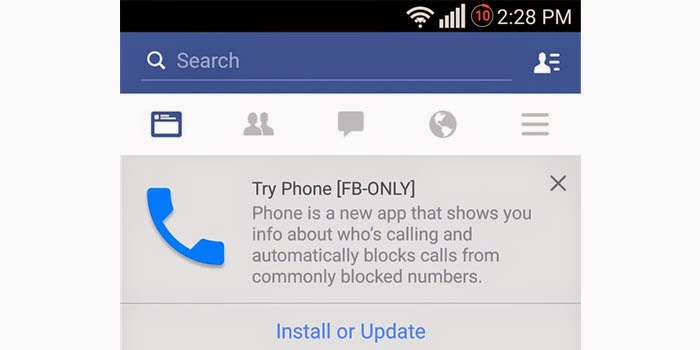
Talk about weird app names, and Facebook’s ‘Phone’ app could come right on top in that list, even as the new dialer app prepares for deployment to the general public. This particular service is in its testing phases right now, and hence, very little is known about it.
Facebook has this habit of naming its own apps after default Android apps to increase the chances of users tapping on them. And under this rule, there couldn’t have been a better name for its dialer app than ‘Phone’ itself. The company is so committed to this idea that the icon of this app also appears to resemble that of the default Android calling app.
According to Android Police, this service is something that the social networking giant is testing internally right now. However, as is often the case, it has accidentally leaked out, and notifications to download it have reached a small amount of people apparently.
Clicking on them takes you to a ‘no page found’ error which further indicates that the app is not supposed to be in the public domain yet. Judging by the description which is accompanying the app’s notification, it’s going to feature a caller ID service as well, which is bad news for Truecaller, we guess.
Apart from getting details about the person who’s calling you, you’ll also be provided with the ability to block numbers. Additionally, the app will block commonly blocked numbers for you as well.
There’s no official word on when the Facebook ‘Phone’ app will officially be made available for Android devices. We’ll have more on it when additional details are out.
The first sign of Facebook beginning to integrate its 19 billion dollar acquisition, WhatsApp with its own services has arrived in the form of a new button on the social network’s Android app. After staying away from this step for around a year, both the companies have decided to make the inevitable happen finally.
The newest version of Facebook for Andoroid (v31.0.0.7.13 to be exact) has been found to be sporting a completely fresh ‘Send’ button. As has been spotted by Geektime and as you can see in the images it has released, the ‘Send’ button beside the ‘Like,’ ‘Comment’ and ‘Share’ keys bears the familiar ‘WhatsApp’ icon on it.
What this button does is still not completely clear, but we’re guessing it allows you to share a Facebook post with your WhatsApp contacts directly. However, that’s not the only way in which the two platforms are expected to be integrated.
Rumor has it that Facebooks’ Messenger which is extremely popular in the west and WhatsApp which is extremely popular in the east, will be able to work in a cross-platform manner of some sort. It’s being said that teams from both the companies are working together at the moment to make something like this possible.
Back in February last year, WhatsApp was acquired by the social networking giant for the astonishing sum of $19 billion. This gave Facebook a huge advantage in terms of market coverage since its Messenger application was struggling to make inroads in Asian nations.
The WhatsApp ‘Send’ button appears to be available in a very limited manner on the Facebook for Android app; so chances are you won’t even get to see it right now. But we’ll make sure to infirm you when it’s officially out.
Whatsapp has finally integrated voice call functionality into the world’s most popular instant messaging app. The WhatsApp call feature hasn’t arrived to everyone, so don’t be surprised if you don’t yet have the added functionality, but rest assured, it is coming, and soon.
The story was broken on Reddit, when a user by the name of Pradnesh Patil (pradnesh07) posted some screenshots showing a Calls tab in the app and later a video showing the functionality in action.
All you need to do to get the new feature is download the latest version of the app (v2.11.508) via WhatsApp’s website and sideload it (you’ll need to enable Unknown Sources in your Security settings first) and get yourself an invitation to use the new feature from someone that already has it.
You’ll also need to be running Android 4.4 KitKat (although WhatsApp voice calling has also been reported by some users running Android 4.3 Jelly Bean). The most success seems to be coming from Lollipop-based phones though.
Several attempts have been made to understand the invite system, because not everyone seems to be able to activate the new feature, even with the new version, an invite and KitKat on their phone. Nevertheless, the feature has been confirmed by multiple users and doesn’t seem to be geo-specific or server based. Here’s that video I mentioned of it in action.
There is another way for rooted users to force the feature onto their phones, but it is a bit of a pain, as you’ll need to be connected to your PC and open a terminal every time you want to WhatsApp call someone (until it is enabled permanently for you).
Just open a terminal emulator and enter the following command:
su -c am start -n com.whatsapp/com.whatsapp.HomeActivity
Have you got the feature yet? Will you now turn to WhatsApp as your default dialer?
A new version of the Facebookapp has turned up on Google Play and it is aimed directly at users who want something that uses less data and runs smoothly on low-end devices. The Facebook app can use a lot of data and that is a problem for people on limited plans. Sometimes the app can also be sluggish on devices that are on the low end of the power scale with limited performance.
Facebook Lite is designed to work well in all network conditions. In fact, the app was designed to operate on 2G networks and in areas with limited network connectivity. The app is also very small at under 1MB making it quick to download.
The small app is also fast loading and designed to be efficient with data so it consumes less of the user's data allotment. The app launched in a few locations to begin where networks aren’t as robust as they are in many developed nations.
The app launched in Bangladesh, Nepal, Nigeria, South Africa, Sudan, Sri Lanka, Vietnam, and Zimbabwe to start. The app is on Google Play at this linkright now but might not be available for everyone (direct apk download link below).
After doing a little cleaning up of unqualified services, WhatsApp is now coming to the desktop. A long-desired feature for fans, WhatsApp is now available on the browser — but not any browser. For now, Chrome is the only browser supported, and you’ll need the app to log-in. With a scan of the QR code, you can start chatting on the desktop, and leave your phone on the desk next to you. Unless you’re on iOS — the desktop doesn’t support that, either.
To get started chatting via WhatsApp on the desktop, head into your app on Android, Windows Phone, or BlackBerry. You’ll see a “WhatsApp Web” screen, which is where you scan the QR code on WhatsApp’sweb portal.
The scan links the browser experience with your app. WhatsApp also says your phone needs to stay connected to the Internet for it to work, which means turning your phone off or slipping it into Airplane Mode could disable your browser session.
Unfortunately, this is still early days for WhatsApp on the desktop. Chrome seems to be the only browser supported, so those firmly entrenched in the Apple ecosystem will have to wait a bit. Internet Explorer fans will also be left out in the cold.
Apple users may not see a WhatsApp version, either. According to WhatsApp CEO Jan Koum, Apple’s “platform limitations” currently prevent the desktop version from being available to iOS users, and could even be why Safari is left hanging.
Almost exactly one year ago, SF Launcher was placed on Google Play as an alternative launcher to whatever it was you were currently using. Now, a year later, a complete rewrite has been introduced, and the developer has named it SF Launcher 2.
Featuring the same overall look, SF Launcher 2 has been updated to support Lollipop devices, featuring tie-ins with Material Design. While the old launcher was missing a few key features, such as drag and drop, you will find that this updated version delivers many great features.
As for the launcher in general, it is quite basic in appearance, giving off a Google Now vibe. Widgets and app folders look like cards from Google Now, and overall the launcher has a fantastically flat and organized look about it.
The app is free to download from Google Play, and a premium version is available as well for $3.99.
Searching for any type of information on the internet, whether it's from Yahoo, Bing, or Google - almost always provides you a link to Wikipedia. Although Wikipeda is not considered a credible website to use as a research source, the site does provide large amounts of information that can be seen as pretty much accurate and spot on with background and history on the searched topic. This week the Wikipedia app on Android received more than a beautiful facelit, and it’s looking good.
The Wiki app for Android was released back in February 2012, and hasn’t seen too many major updates since. Today is a time for change - the Wiki app for Android has received some Material Design love with new usability features. The updated app features images more prominently with parallax scrolling. Articles now feature a contextual-image and description at the header. Going hand-in-hand is an image viewer which allows you to tap an image to display as a larger pop-up panel - tapping again minimizes the image.
The new update includes the “read more” feature - which provides you three related pages to the searched topic. The search feature has been improved and includes a list of recently searched topics, but still retains a dull gray search bar.
The new updated app is staying current with material design influences and animations. Improving the app’s usability makes it look and feel more modern.
Nokia surprised the mobile community this past summer when the company unveiled its first ever Android app, Z Launcher. With its devices and services business out of the way and its obligations to Microsoft regarding Windows Phone gone, the company wasted no time in embracing Google’s mobile platform.
Z Launcher, a nifty and intelligent Android launcher that places a user’s most popular apps on the home screen and changes based on the time of the day, was initially released as a pre-beta intended to be made available to 10,000 initial testers.
By the end of its first day of availability, Z Launcher had been downloaded 100,000 times and Nokia had to stop accepting new users.
Nokia’s Android launcher app has received a few big updates in the past, but none were as big as the update the company just announced on stage during the Slush 2014 conference in Finland.
First and foremost, Nokia is finally stripping the app’s “pre-beta” label and releasing Z Launcher as an open beta available for download in the Google Play app store. For the many people who didn’t download it fast enough when it was first launched this past summer, the wait is finally over.
Beyond that, Nokia is also rolling out several new features to Z Launcher that will debut in the new public beta release:
Faster Speed: Z Launcher has had small speed advancements in many areas, from the obvious, like optimizing on specific handsets, to the more obscure, like “finger tracking latency.”
Improved Prediction: The Z Launcher team incorporated more context into the app’s algorithm – including Wi-Fi networks – while intelligently pruning the data to focus on the key elements that give users the best results.
Refined Scribble: Z launcher now has improved the recognition and response time and an added Pinyin Chinese language support.
Rooted Device Capability: In response to the feedback we received from users on our Z Launcher forum, we now allow installation on rooted devices.
During a meeting with BGR, Nokia’s head of Z Launcher Brook Eaton said that the response to the app has been tremendous thus far. In particular, he noted that users love Nokia’s unique “Scribble” feature, which allows a user to draw a letters anywhere on the screen with a fingertip, and Z Launcher will drill down the apps displayed on the screen as he or she writes.
So, for example, drawing a “T” will display apps that begin with a T, and then drawing a “W” might remove anything from the screen other than the Twitter app.
Here’s how Nokia describes the app’s two key features:
Prediction: The app learns a user’s habits to intelligently surface the right apps, contacts and web content on the home screen at the right time when the user needs them.
Scribble: With the touch of a fingertip, a user can draw a letter on the home screen to bring up corresponding content that begins with that letter in as fast as one second.
Z Launcher is available for free as an open beta beginning Tuesday, and more information can be found on Nokia’s Z Launcher site, which is linked below in our source section.
UPDATE: To download Z Launcher, follow this link and then click “Get it now.”